


🚀
GUIDE GRATUIT
RFP Chatbot : Ne partez pas d'une page blanche
Un mode d'emploi pensé pour les métiers avec un guide pas à pas pour rédiger chaque section de votre appel d'offres.
Méthodologie guidée : Quoi écrire dans chaque chapitre (Contexte, Fonctionnel, Tech)
Concepts clés décryptés : RAG, LLM, Base de connaissance
Modèles inclus : Structures prêtes à l'emploi pour vos cas d'usage
👉 Télécharger le guide
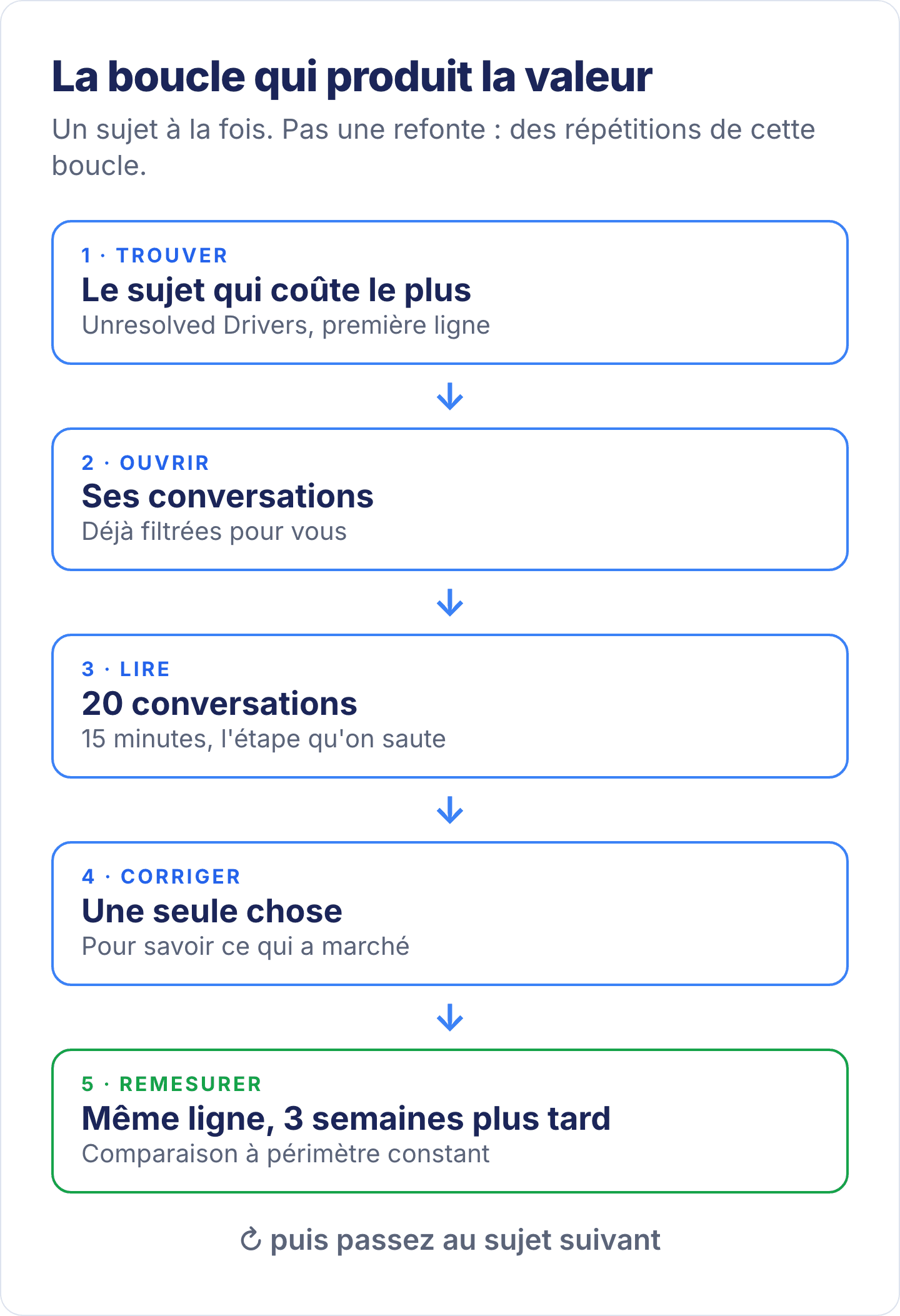
To improve an AI chatbot’s resolution rate, the right answer is not to rebuild the bot, but to repeat a one-hour loop every month. Among ViaSay customers in production, this loop is what separates the bottom from the top of the observed range, between 50 and 85% measured resolution. Here are its five steps, with the screen that goes with each one.
This article starts from the real resolution rate, the one you get by having every conversation read by an AI, as explained in our article on measuring resolution rate. It is not the automation rate displayed at 95%, which counts conversations that ended without an agent. The real rate is around 50%, and each pass through the loop adds a few points to it.
Key takeaways
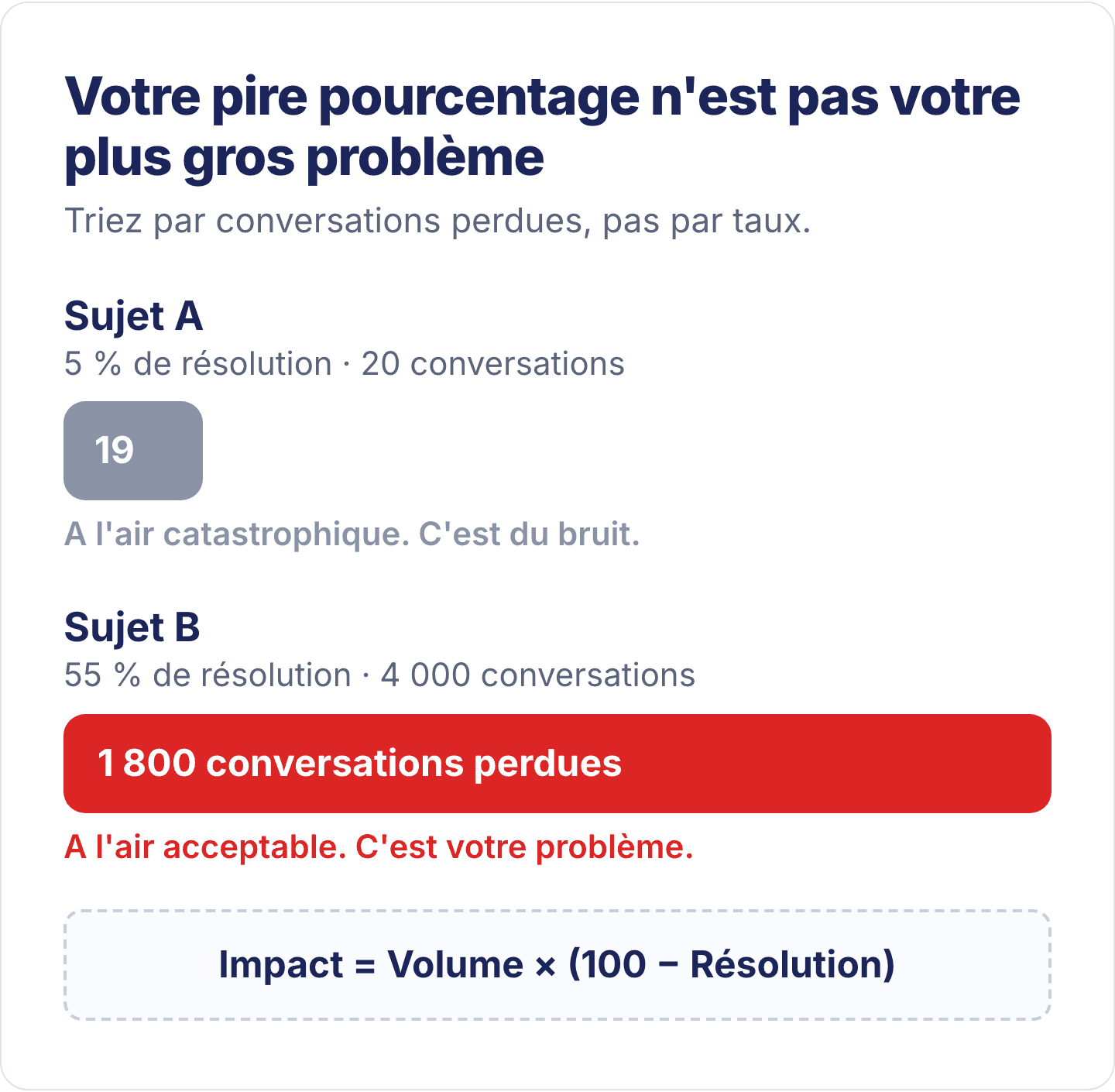
Rank your topics by impact, not by rate. Impact = Volume × (100 − Resolution): the topic that costs you most is almost never the one with the worst rate.
Read 20 conversations from the top topic. Within a quarter of an hour, the pattern emerges, and it almost always falls into one of five boxes: knowledge gap, understanding, flow, scope or policy.
Fix one thing only. The knowledge gap, meaning information missing from the knowledge base, is the most frequent diagnosis and the quickest to fix.
Measure again three weeks later, on the same table and with the same criteria, then move on to the next row.
A rate that rises while volume stays flat proves you are improving the bot, not the way you count.
Step 1: to improve the resolution rate, start with the most costly topic
To choose which topic to tackle first, rank your topics by their number of unresolved conversations, not by their resolution rate. The opposite reflex, tackling the worst rate first, can cost you a week on a topic that barely matters. The right ranking follows this formula:
Impact = Volume × (100 − Resolution)
Two examples show the difference:
A topic at 5% resolution over 20 conversations looks disastrous. Yet it represents only 19 failures: it is noise.
A topic at 55% resolution over 4,000 conversations looks acceptable. It represents 1,800 failures: this is the one to tackle first.
In ViaSay, this ranking is already done. The Unresolved Drivers table (the causes of non-resolution), in the Performance tab, ranks your topics by impact. For each one, it shows the volume, the resolution rate and the knowledge gap rate.
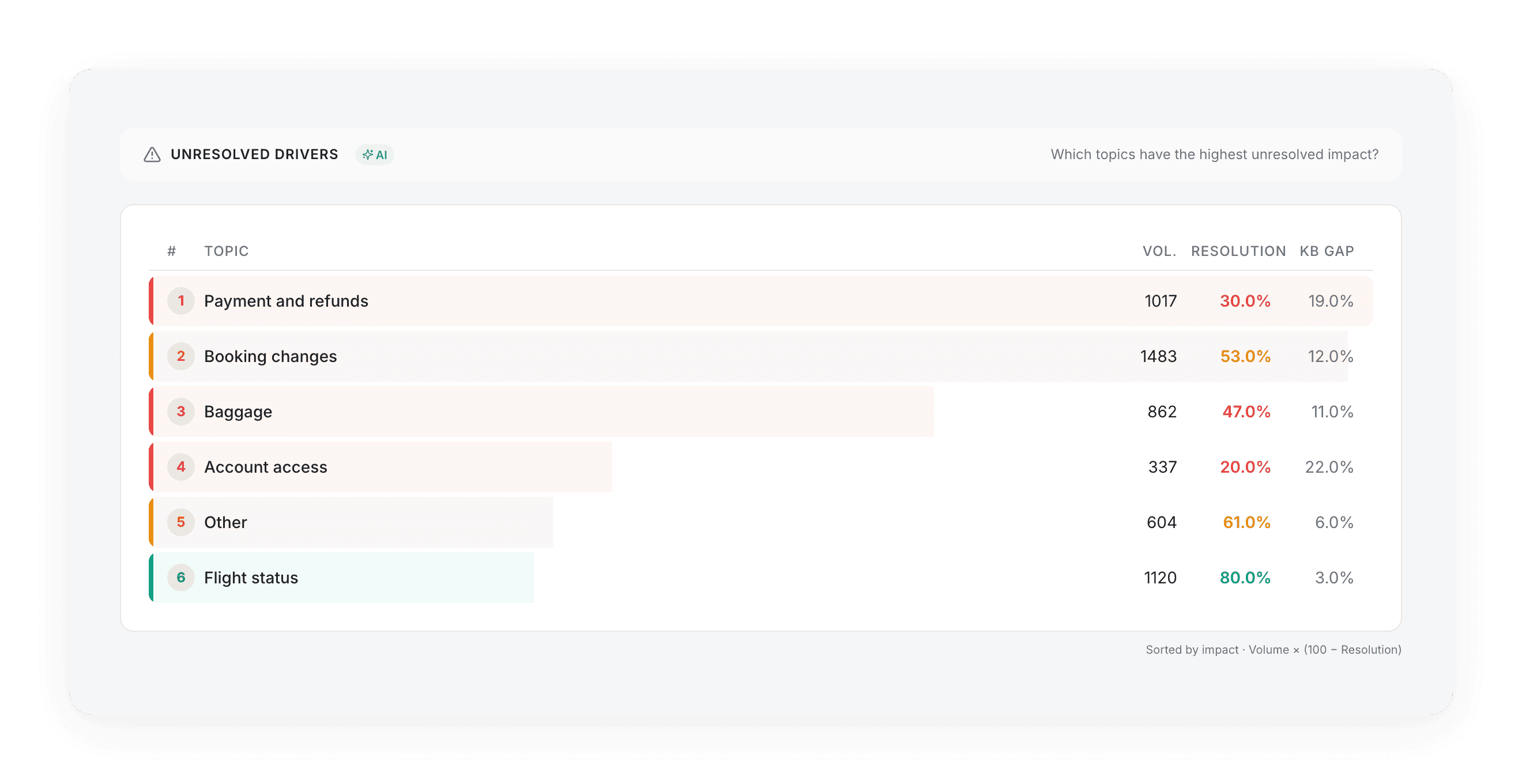
In this screenshot (demo data), “Booking changes” shows 53% resolution, better than “Account access” at 20%. Yet it ranks higher, because it has 1,483 conversations against 337: this is the one to open first. Always start with the first row of the table.
Step 2: open the unresolved conversations for that topic
You cannot fix a resolution rate directly: it is the conversations that show what failed. In ViaSay, one click on the topic opens a panel with its conversations, already filtered on unresolved ones. Each row shows the evaluator’s verdict, its CX Score (its rating of the experience) and the user’s first question.
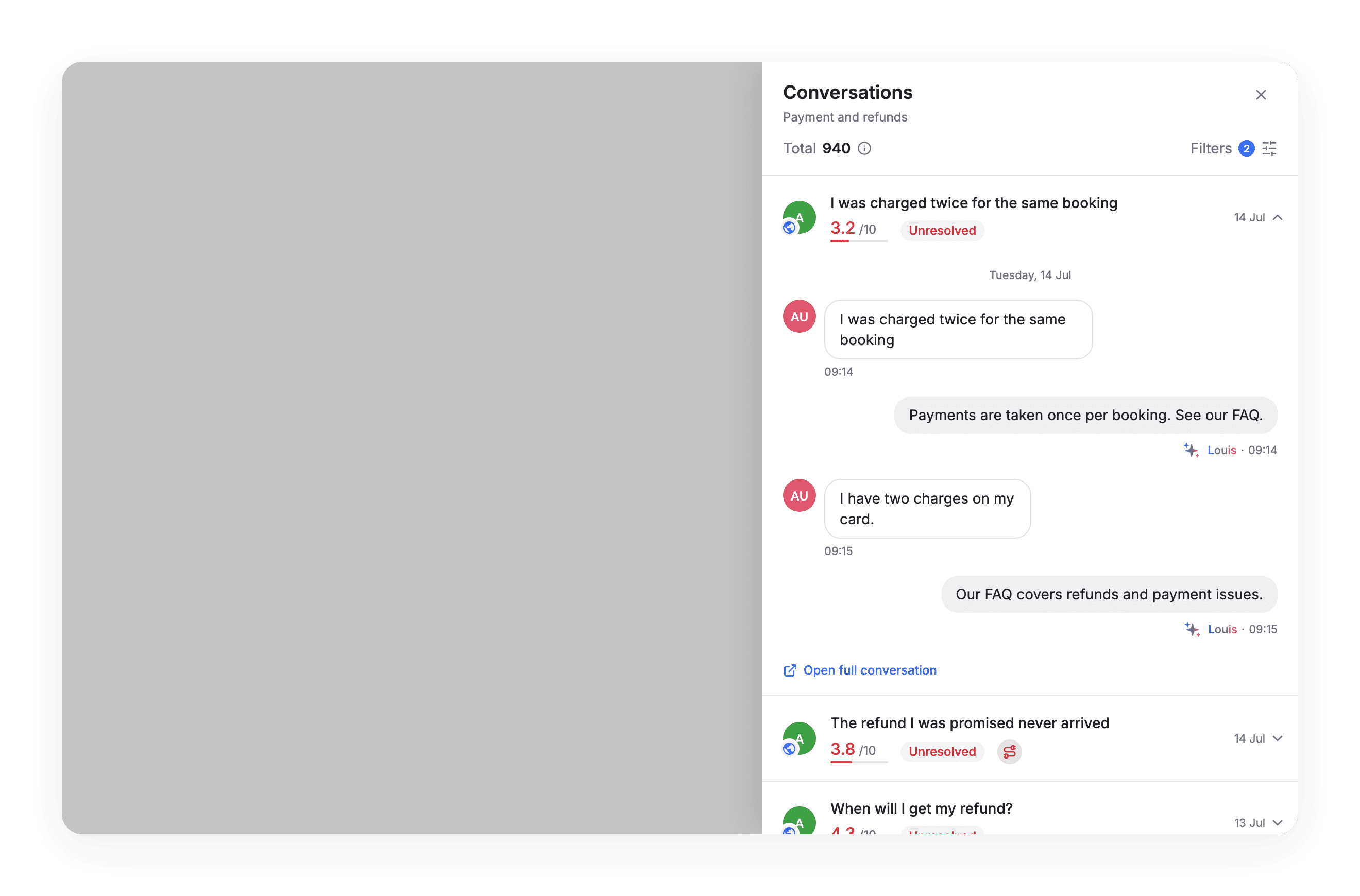
Before opening a single conversation, hover over the tags. The evaluator, meaning the AI that judged the conversation, explains there in one sentence why it is unresolved. It is the fastest way to sort a list of 200 rows.
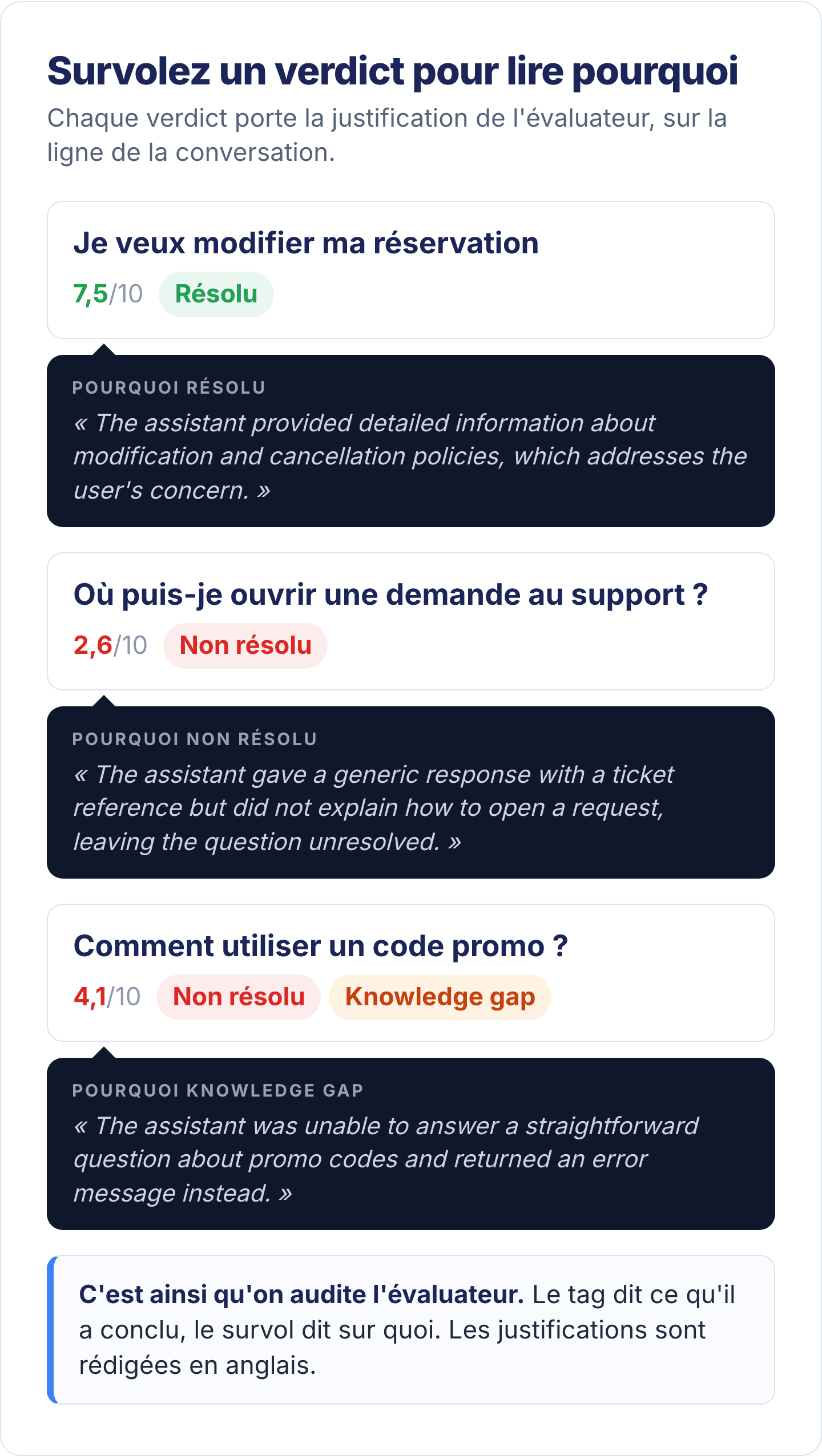
For example, you read “the assistant provided a generic response” three times and “did not have the information about” twice. You already know where to look.
Step 3: read 20 conversations to find the common cause
Reading 20 unresolved conversations is the step you will be most tempted to skip, and the only one that produces a diagnosis. It takes a quarter of an hour. Read your customers’ actual messages, not the AI’s reasoning: the common pattern almost always falls into one of these five boxes.
They all ask for the same thing, which the bot does not have. This is a knowledge gap: the team that writes the knowledge base fixes it.
The bot misunderstands the question. This is an understanding problem: you fix the intents, their examples, the rephrasing.
The bot understands, but the flow leads to a dead end. This is a flow design problem: the person who builds the bot (the bot builder) fixes it.
They ask for something the bot is not meant to handle. This is a scope issue: you route these requests to the right channel, without changing the bot.
The bot is right, but they do not like the answer. This is a policy issue: the business team that owns the rule decides, not the bot.
This last case is real and common: sometimes the right conclusion is that the bot is fine. An unpopular refund policy, correctly stated, produces conversations that are unresolved in the customer’s eyes, even though the bot did its job.
It is not up to the bot builder to change that policy. And only reading the conversations can lead you to that conclusion.
The 20-conversation reading grid
The five diagnoses, the question to ask for each one, and who fixes it. A page to keep open while you read.
Step 4: fix one cause at a time
Choose one topic, one cause and one fix. If you fix five things at once, you will not know which one worked, and next month you will start from scratch. The most frequent case, and the quickest to fix, is the knowledge gap: the bot did not have the information.
An AI agent answers from the knowledge base: if the information is not there, it cannot give it. The Performance tab shows where these gaps are concentrated, topic by topic.
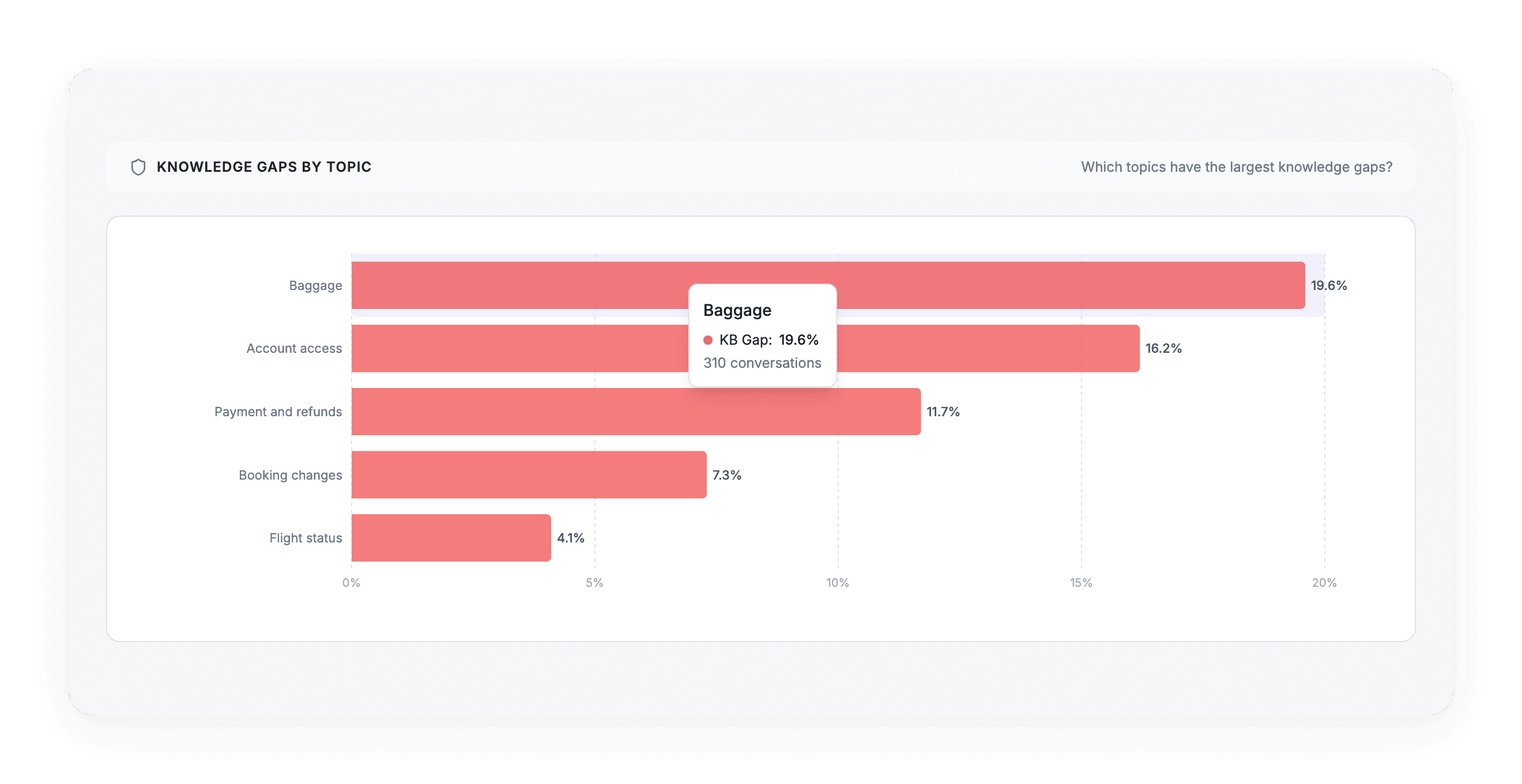
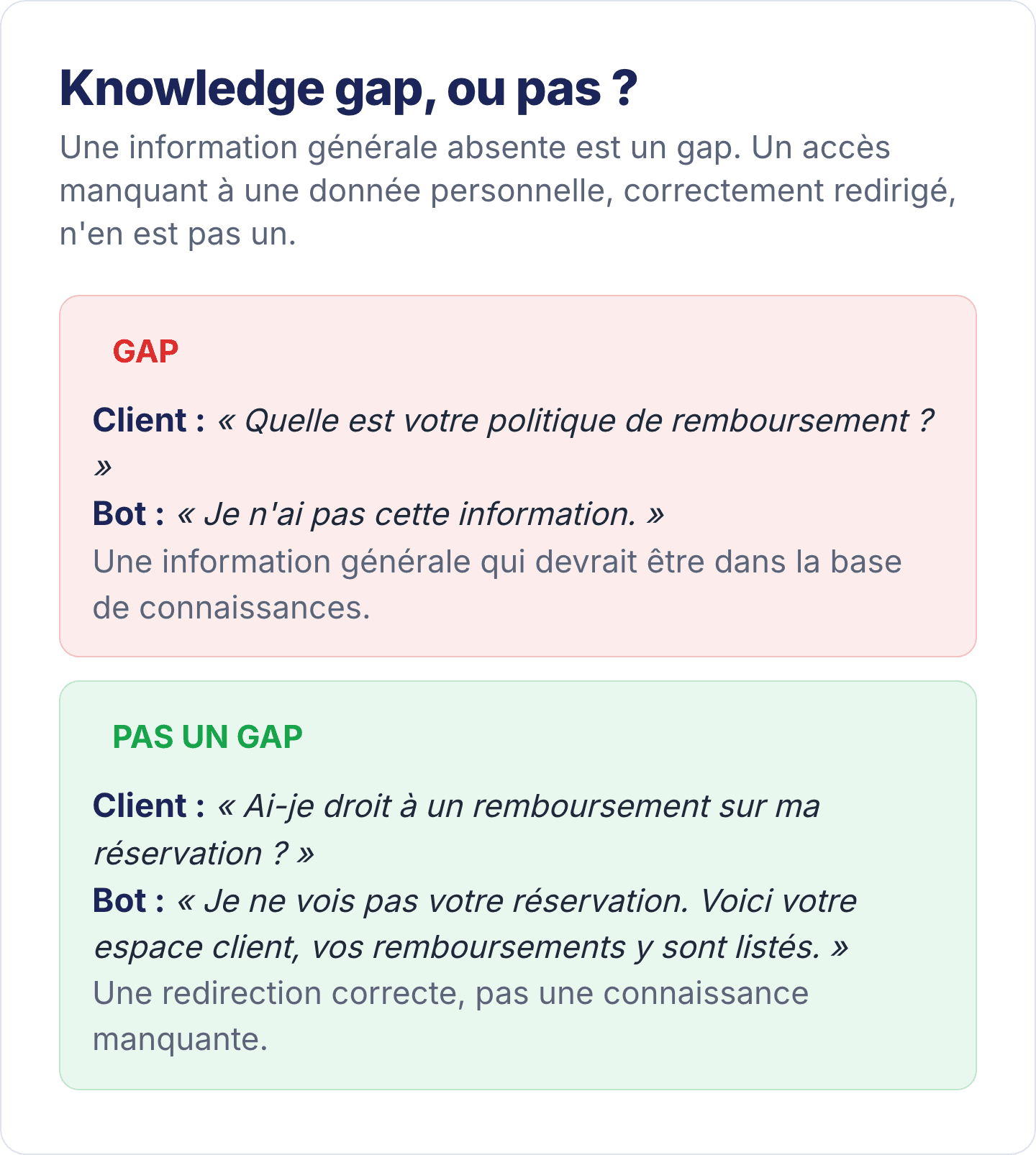
A point of vocabulary avoids false fixes. A knowledge gap is missing general information: the refund policy, the permitted baggage dimensions, the service’s opening hours.
It is not a knowledge gap when the bot has no access to personal or real-time data, and correctly directs the user to where it can be found. The bot does not need to know a customer’s balance: it needs to know where the customer can see it.
To read a topic’s knowledge gap rate, remember three thresholds:
below 15%, the topic is healthy;
between 15 and 30%, it needs watching;
above 30%, nearly one conversation in three runs into missing information. This is a content emergency, and a list of articles to write this week.
The other diagnoses are fixed elsewhere: a dead end in the flow design, a misunderstanding in the intents and their examples, an out-of-scope question through better routing. Make one fix, then wait.
Step 5: measure again three weeks later, on the same table
Three weeks after the fix, find your topic’s row in the Unresolved Drivers table. Compare its resolution rate, its volume and its knowledge gap. The table, the criteria and the population are the same: the comparison is fair.
If the figure has moved, you know why. If it has not, it was not the right cause, and you have already read 20 conversations to find the next one.
This three-week delay lets enough new conversations on the topic come in for the figure to be meaningful. The evaluation is also done in batches, after each conversation ends, with a slight lag.
Then move on to the next row of the table. That is the whole method: repeat this loop, one topic at a time, rather than overhauling the bot.
See this loop running on your conversations
A 30-minute demo, run on your own topics.
Two common traps: the “Other” topic and low resolution without a knowledge gap
Two situations often mislead the diagnosis: a large, poorly resolved “Other” topic, and low resolution while the knowledge gap is low. In the first case, your topic list is missing a real request. In the second, the problem does not come from the content.
A large, poorly resolved “Other” topic. If “Other” is among your top topics, read those conversations: you will find a topic that has no name. Give it one.
In ViaSay, automatic topic discovery regularly suggests candidates, which you approve or reject.
Low resolution with a low knowledge gap. The bot has the information, and the conversation still fails. Either the flow prevents the user from reaching the answer, or the answer is correct and it is the service behind it that disappoints.
Ten conversations are enough to decide. In both cases, the fix is not in the knowledge base.
On which topics should you replace a scripted flow with generative AI?
Once the loop is in place, a second question arises: on which topics should you replace a scripted flow, meaning answers written in advance, with a generated answer? The first candidate is usually a scripted topic with a high knowledge gap: the information is missing, and a scripted flow will never be able to look for it.
The AI Impact section of the Overview compares, on your conversations, those handled by generative AI and those handled by a scripted flow: resolution, knowledge gap, CX Score and CSAT. In the screenshot from our previous article, AI resolved 61% against 33% for scripted flows, with a knowledge gap of 7% against 19%.
Two words of caution when reading this. First, it is not a controlled experiment: AI is not deployed at random, and it is often switched on for topics that are already easy, or already difficult.
Second, the overall figure matters less than the topic-by-topic reading. The right question is not “does AI do better?”, but “on which of my topics does it change the outcome?”.
Frequently asked questions
How long does it take to improve a chatbot’s resolution rate? A full loop takes about an hour of work and three weeks of waiting. The first resolution points come with the very first fix, if it targets a high-volume topic. Bots that repeat this loop every month sit at the top of the range observed in production, between 50 and 85% measured resolution.
Do you need to rebuild the bot to improve its resolution rate? Almost never: most unresolved conversations are concentrated on a few topics, and the most frequent cause is information missing from the knowledge base. Fixing the content of a high-volume topic pays off more than a rebuild.
What is a knowledge gap in a chatbot? It is a conversation where the bot did not have the general information requested: a policy, a price, a procedure. Correctly directing the user to personal or real-time data, such as a customer account area, is not a knowledge gap. A topic’s knowledge gap rate points directly to the content you need to write.
Why read the conversations if an AI has already evaluated them? The evaluator tells you that a conversation failed and gives a one-sentence reason. Reading 20 conversations reveals the common pattern: it distinguishes a content problem from a flow, scope or policy problem. That is what decides who fixes what.
Should you replace scripted flows with generative AI? Decide topic by topic, by looking at the comparison on your own conversations. A scripted topic with a high knowledge gap is usually the best candidate. A scripted topic that resolves well has no reason to change.
